跳到内容

知识库

排障与指南

DBeaver Community 下载与安装排障指南:连接、Windows SmartScreen、Java 25、升级、Defender 检查与杀毒误报。先看目录,需要短答时再回到 下载 DBeaver 26.1.5 或 常见问题。

首次查询清单

从安装到成功执行 SELECT 的简短路径。

  1. 使用对应操作系统的安装包安装 Community 26.1.5(优先 exe/DMG/deb,勿覆盖 ZIP 目录树)。
  2. Create a connection in Database Navigator and test credentials.
  3. 打开 SQL Editor,编写带限制的 SELECT,用 Ctrl+Enter 运行选区。
  4. Confirm rows in the result grid and note the status bar fetch timing.
SELECT c."FirstName", c."LastName" FROM "Customer" c LIMIT 20;
无法连接 to the database

警告
Connection fails or hangs before the navigator shows schemas.
原因
Wrong host/port, driver mismatch, firewall, missing SSH tunnel parameters, or incomplete custom auth on imported CSV/XML connections.
修复
  1. 重新打开连接设置,确认驱动、主机、端口、数据库与用户。
  2. Use Test connection before saving.
  3. 若使用 SSH,请在测试隧道前设置所需数据库参数(曾修复 Firebird 在缺少参数时的隧道测试问题)。
  4. 在 Linux 上使用基于浏览器的认证时,请确保桌面存在受支持的浏览打开动作。
验证
Navigator expands schemas and a trivial query returns rows.

Windows SmartScreen 阻止启动

警告
Windows reports an unrecognized app and refuses to start dbeaver.exe.
原因
Reputation delay on new builds, or historically an unsigned executable inside a ZIP package.
修复
  1. Prefer the Windows installer build over ZIP when possible.
  2. 在 SmartScreen 中打开“更多信息”,仅在信任安装包来源与版本时选择“仍要运行”。
  3. Confirm the version string matches 26.1.5 after launch.
验证
Application window opens and Help shows Community 26.1.5.

杀毒软件误报

警告
AV or browser advisors quarantine the installer or dbeaver.exe.
原因
Heuristic engines sometimes flag Java desktop apps or freshly published binaries. Community history includes single-engine VirusTotal hits that cleared on rescan.
修复
  1. Re-download and compare checksums when published.
  2. Submit the file to your AV vendor or wait for signature updates.
  3. 不要全局关闭杀毒;若策略允许,仅将例外限定到已验证的安装路径。
验证
Clean scan on the same digest, then successful launch.

More on trust and provenance

Java 要求与 jre 文件夹

原因
DBeaver needs Java 25 or higher. Older system JDKs fail to start the workbench.
修复
  1. 使用捆绑 OpenJDK 25 的官方安装包(自 23.0 起为标准)。
  2. 若要强制使用本地 JDK,请删除安装目录中的 jre,并将环境指向 Java 25+。
验证
About dialog loads without JVM version errors.

升级而不丢失连接

  1. 运行新的 Windows 安装程序,或安装新的 deb/rpm/DMG 包。
  2. 若使用 ZIP,请解压到新目录。不要解压覆盖旧目录树。
  3. Start DBeaver and confirm connections still appear.

设置保留在用户文件夹 DBeaverData。删除旧应用目录不会删除这些数据。

Microsoft Defender 排除检查 on startup

警告
Startup shows a Defender 排除检查 error on Eclipse-based builds.
修复
  1. Open Window → Preferences → General → Startup and Shutdown.
  2. Enable skip for Microsoft Defender 排除检查 when your policy allows.
  3. Alternatively create .eclipse/.settings/org.eclipse.ui.prefs with:
eclipse.preferences.version=1 windows.defender.startup.check.skip=true
验证
Restart completes without the exclusion error dialog.

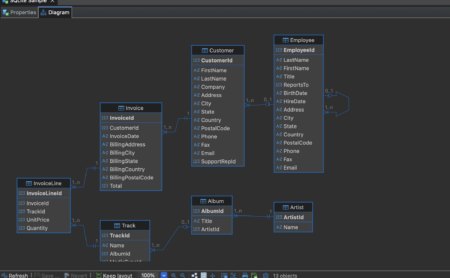
阅读外键 on an ER diagram

选中关系线时,状态区可能显示约束名,例如 fk_payment_customer。写 join 前先用图确认基数。

ER Diagram · relationship detail
Dark-theme schema diagram with foreign-key lines between tables

最佳实践

  • 在大表上保持适中的抓取限制,以避免类似 Softonic 对重型网格反馈中提到的界面变慢。
  • 将生产凭证存于操作系统密钥库或连接认证流程;避免分享含密钥的截图。
  • 使用已保存的数据传输任务做可重复导入,使映射在更新后仍然保留。
  • 每个 Community 小版本发布后,浏览发行说明中影响你所用引擎的驱动修复。

下载 26.1.5 常见问题

继续浏览

相关页面

下载 Community 26.1.5

Windows、macOS 与 Linux 安装包,含更新日志与完整性说明。

探索 DBeaver 功能

SQL Editor、Data Editor、ER 图、传输与 AI Chat。

解决安装问题

Java, SmartScreen, antivirus, upgrades, and connection checks.

Also read the DBeaver 常见问题 and trust and security pages. Last reviewed: .

下载